Buy followers, the right way.
Meta won't sell you followers. It will show your post to the people most likely to follow you. Here's the setting in all three places, and how to read what it costs.
Real followers come from the right people seeing you
Bought followers are accounts that never watch, never comment and never buy. What you actually want is reach: your best post in front of the people most likely to follow you. Meta sells exactly that, and it’s built into every way you can run an ad.
There’s no goal called “followers.” There’s a goal that sends people to your profile, and Meta says, in its own words, which one is meant for follows. You’ll find it in three places:
| Where | Pick this | The line Meta puts under it |
|---|---|---|
| instagram.com | Visit your profile | “Best for brand awareness and follows” |
| Business Suite boost | Get more profile visits and engagement | “…likely to visit and follow your Instagram profile…” |
| Ads Manager | Traffic › Instagram profile visits | “…people most likely to visit or follow your profile” |
Start with the first one. It’s the fastest, and all it needs is a professional Instagram account.
Which post matters more than any setting
I give every post 6–12 hours organically before I boost it or move it to Ads Manager. A winner doesn’t have to be a high-view or high-reach post. Look at the key metrics, follows and profile visits first, and ask one question: is it outpacing your average?
The post that beats your average is the one worth paying for, even if its views look ordinary. People are already following because of it; paid just puts it in front of more of them.
Path 1: boost it from your profile, on instagram.com
- Don’t pay the Apple feeIf you pay at the moment you boost in the Instagram iPhone app, you pay through the App Store and Apple adds its service fee. Boost on instagram.com instead, or add funds to your ad balance first (in the app: Your dashboard › Ad tools › Available funds › Add funds) and boost from that balance.
- Pick the postOpen the post or reel you want to boost and click Boost.
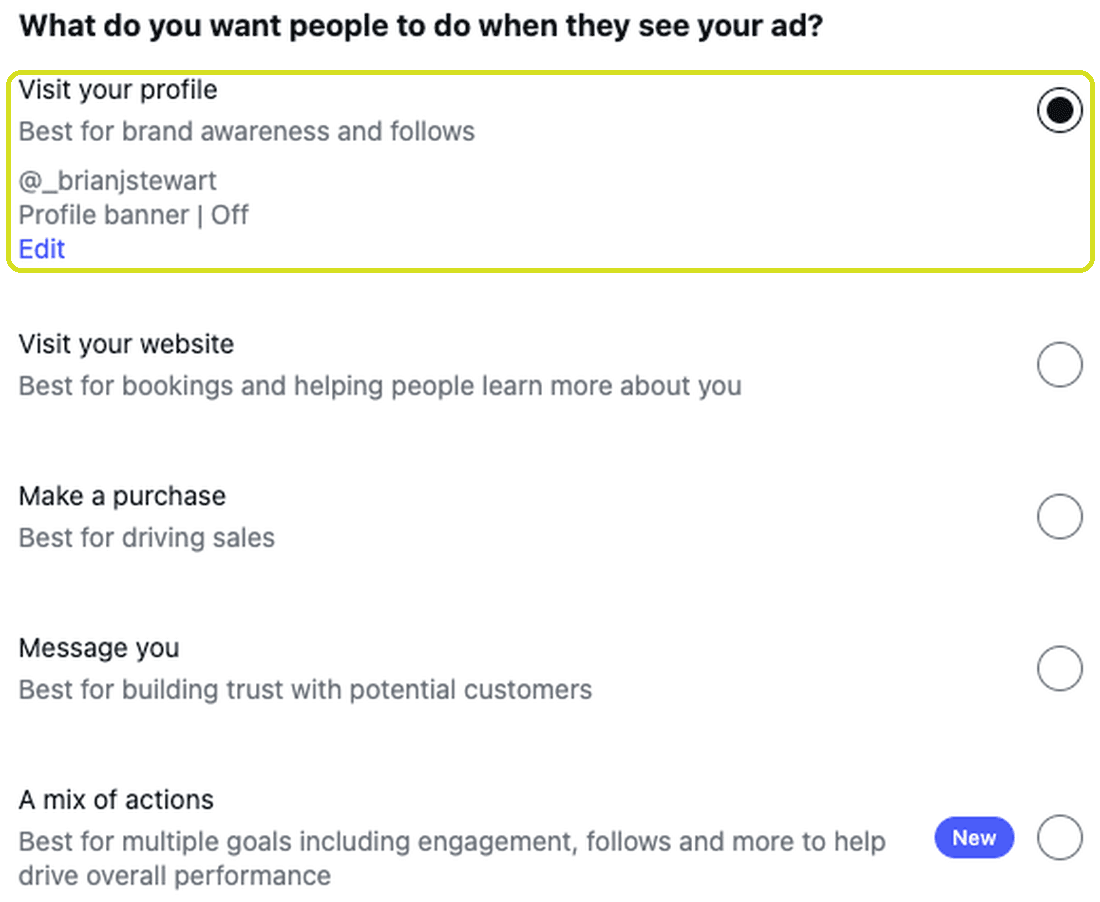
- Goal: Visit your profileUnder What do you want people to do when they see your ad?, choose Visit your profile. Meta’s line under it: “Best for brand awareness and follows”. A mix of actions also mentions follows, but it works toward several results at once. When follows are the point, pick the goal that’s about your profile.
- Audience: people similar to your followersOn Automatic, Instagram advertises to people similar to your followers. If your followers are your buyers, that’s the right start. Create your own lets you set location, age and interests yourself.
- Budget and duration: give it an end dateSet a daily budget and choose Set duration, not Run this ad until I pause it. Meta shows its estimate of profile visits as you move the sliders. Three to six days is enough to read a result.
- Check the preview, then boostThe button under your post should read Visit Instagram profile. That’s where every tap goes. Then click Boost post. Meta reviews the ad before it starts running, and you’ll get a notification when it’s approved.
Your profile has to finish the job
When someone lands there, they should see in two seconds who you are and why to follow. A bio that does that turns paid visits into follows.
Path 2: boost it from Business Suite, on desktop
Business Suite needs a Facebook Page added to your business portfolio, with your Instagram account connected. If you have that, it gives you a goal that instagram.com doesn’t.
- Find the postGo to Content › Posts & reels › Published, hover the post and click Boost.
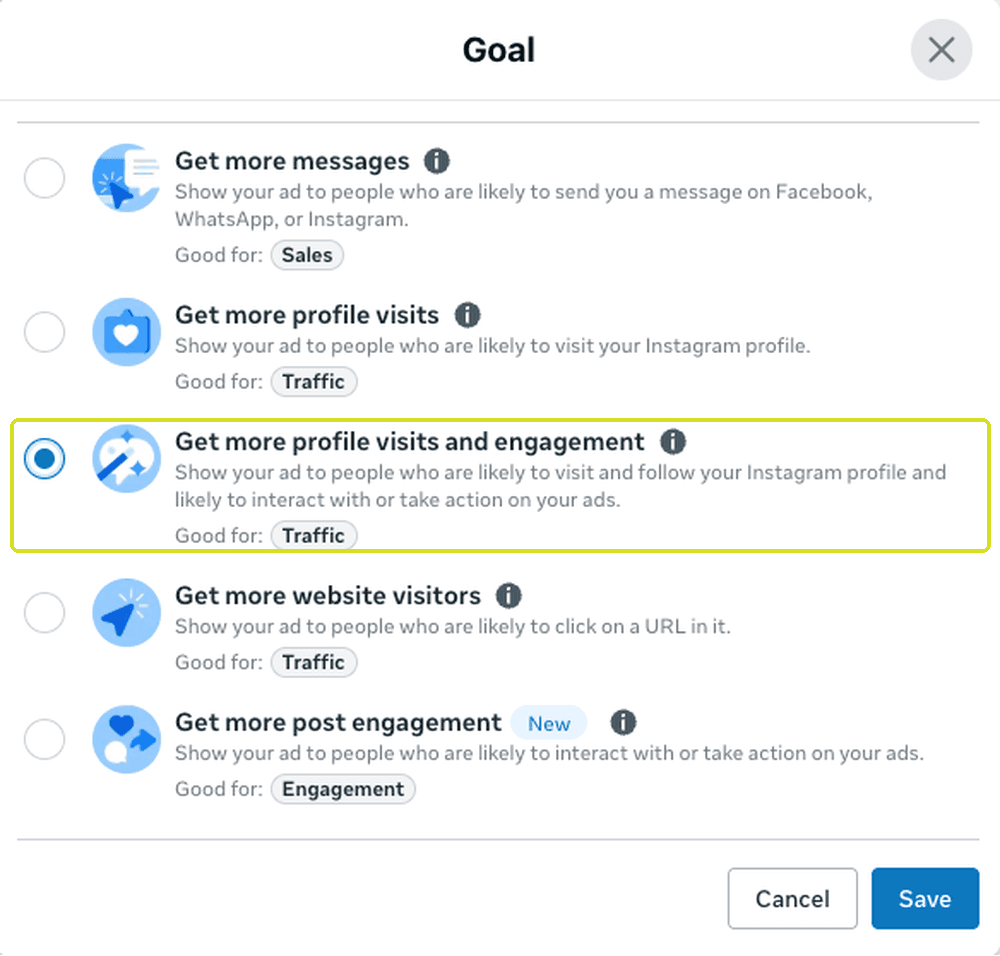
- Change the goalMeta may preselect Automatic. Click Change and pick Get more profile visits and engagement. It’s the only goal in this list whose line says follow: “likely to visit and follow your Instagram profile”. The option above it, Get more profile visits, says only “likely to visit your Instagram profile”.
- Finish it the same wayAudience, a set duration, check the preview, publish. Business Suite adds an Advantage+ audience toggle, which lets Meta widen the audience over time. Turn it off if you want the ad to stay with the people you chose.
Path 3: run it as a real campaign in Ads Manager
When a boost works and you want more control over it, build it in Ads Manager.
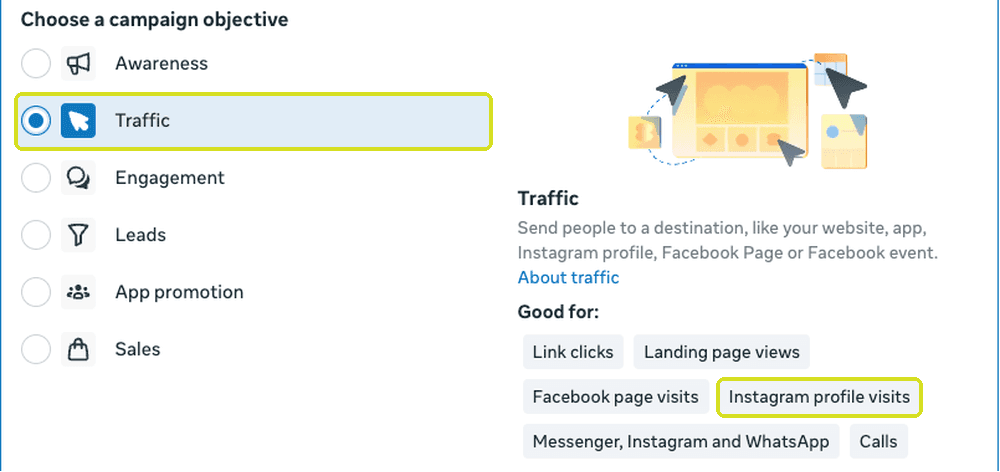
- Objective: TrafficCreate a campaign and choose Traffic. Meta lists Instagram profile visits under Good for.
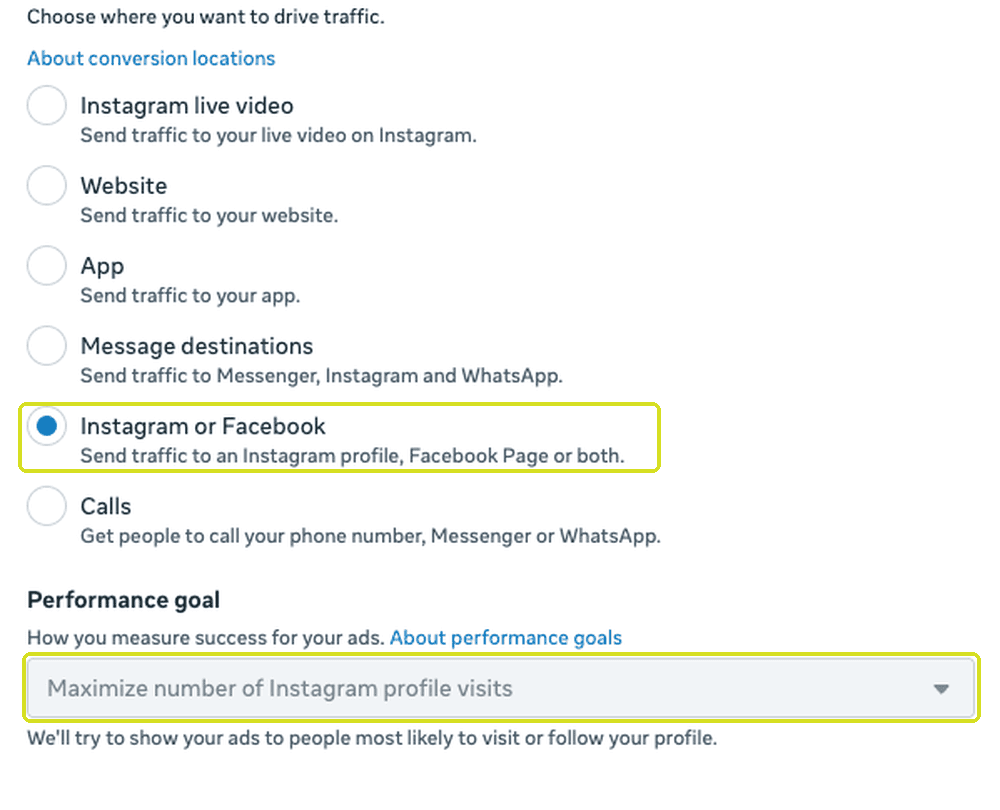
- Send it to your Instagram profileIn the ad set, set Conversion location to Instagram or Facebook and keep only your Instagram profile as the destination. The performance goal becomes Maximize number of Instagram profile visits: “We’ll try to show your ads to people most likely to visit or follow your profile”. Leave your Facebook Page checked too and Meta optimizes for visits to both, so for followers keep it to the Instagram profile.
- Use the post you already haveAt the ad level, build the ad from your existing post rather than uploading the video again.
Cost per follow is the number that matters
Every goal has a sentence under it, and that sentence tells you what Meta will look for. Pick the one that says follow, and you’ve told the system the result you want. It works the same in all three places.
- Open the post’s insightsIn Business Suite, go to Content › Posts & reels and click the post you boosted.
- Read follows from adsThe Follows card splits follows into Organic and Ads. Only the Ads number is what you paid for.
- Do the mathSpend ÷ follows from ads = cost per follow. Compare it boost to boost, and keep boosting the kind of post that brings it down.
It’s an instruction, not a guarantee
Meta finds people likely to follow; whether they do comes down to the post and your profile. Paid only buys the visit. Your content and your bio earn the follow.
What the download adds
That’s the method. The 12-page guide is the method with everything around it.
- Every screen, step by stepAll three paths as they look today, including adding funds in the app so the Apple fee never applies.
- My own boost, by the numbersOne reel boosted to my profile: the profile visits, the follows from ads, and what each one cost.
- Follower to customerSixty days of boosting followed all the way through to sales, and what one customer pays back.
- Six ways to waste the budgetThe mistakes I see most, and what to do instead of each.
- Your numbers, every weekThe chain from cost per follow to cost per customer, and a sheet to fill in.
Take it with you: every screen, my own boost by the numbers, and a sheet for your own. Plus more guides, tips and tricks, and first word on events and launches.